
7 Effective Ways on How to Teach Kids Using ChatGPT
Let me be honest with you.
When I first heard parents were using ChatGPT to help their kids learn, I thought they were crazy.
Isn’t AI supposed to make kids lazy? Won’t they cheat on homework?
But then I watched my neighbor’s 9-year-old finally understand fractions after months of tears and frustration. ChatGPT explained it using pizza slices. Something clicked. She actually got it.
That’s when I realized this isn’t about replacing good parenting or teaching. It’s about having an extra tool in your toolbox.
If you’re a parent who wants to help your kids learn but feels overwhelmed by all the AI technology, this guide is for you. No tech jargon. No complicated setup. Just practical advice from one parent to another.
This guide will help you understand how to effectively teach kids using ChatGPT.

What Exactly Is ChatGPT?
Think of ChatGPT as a remarkably patient tutor who never tires of answering questions.
Your kid asks, “Why is the sky blue?” for the hundredth time. You’re exhausted. ChatGPT isn’t.
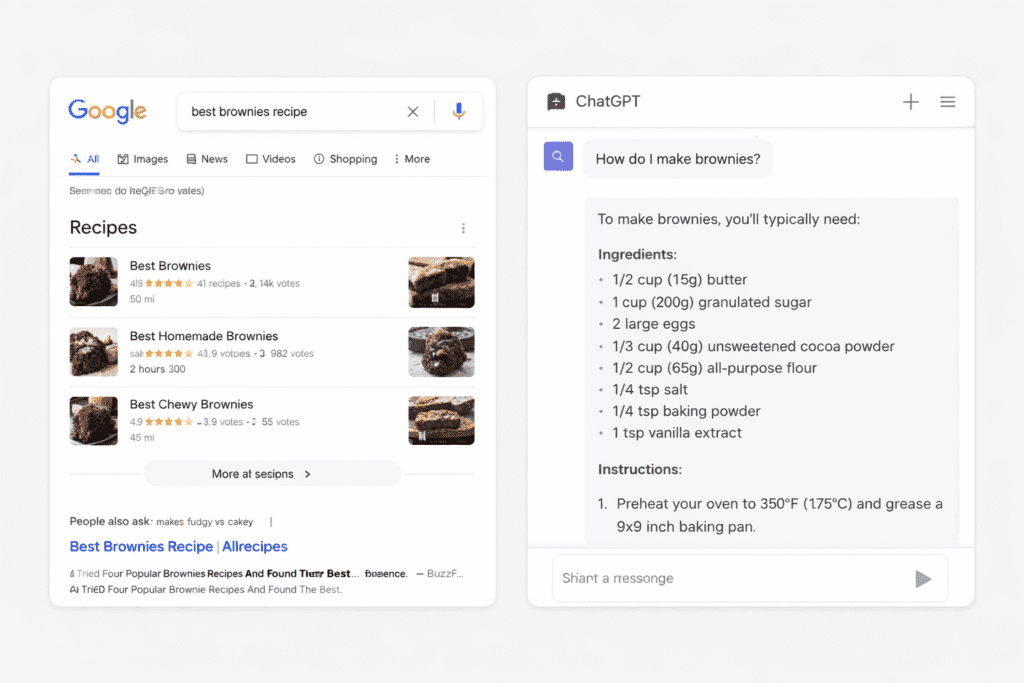
It’s essentially a computer program that can engage in conversations, answer questions, and explain concepts in various ways until they become clear. Unlike Google, which simply throws links at you, ChatGPT actually engages with your child.
The best part? It adapts to your child’s learning style. If the first explanation doesn’t work, it tries an alternative approach.
Quick Comparison:
Google: Gives you 10 million search results. You dig through links.
ChatGPT: Has a conversation with you. Answers directly. Explains simply.
Is My Child Old Enough for This?
Good question. Here’s my take after talking to dozens of parents:
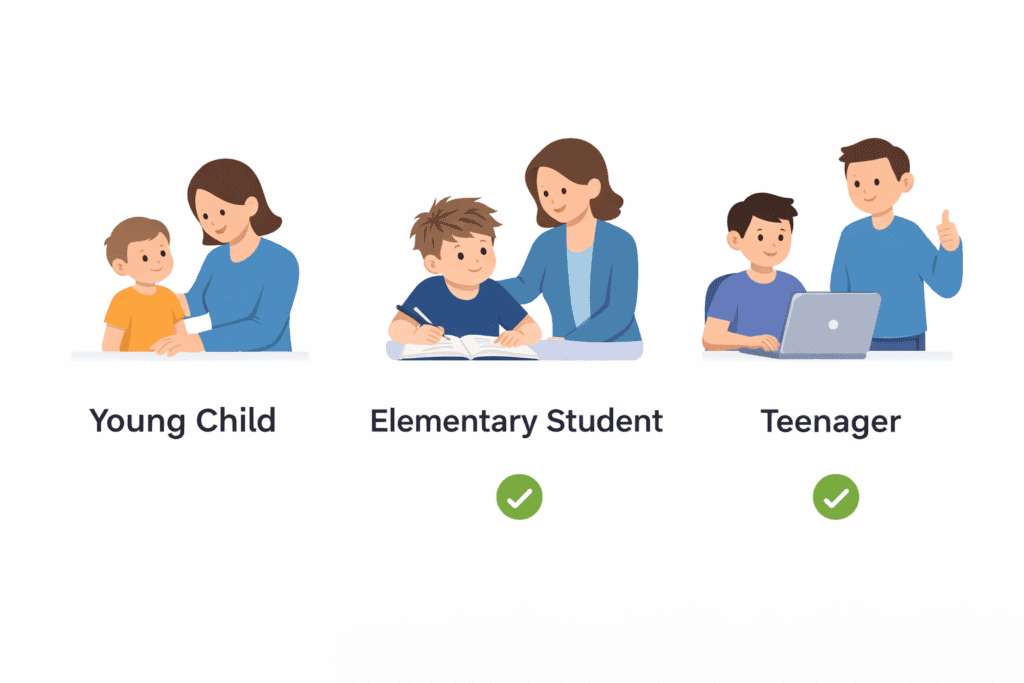
Little Kids (5-8 Years Old)
You control everything. They don’t touch the keyboard. You ask ChatGPT questions and share the answers with it. Think of it like reading a book together.
Elementary School (9-12 Years Old)
They can type their own questions, but you sit right there. Every single time. No exceptions.
Teenagers (13+ Years Old)
They can use it alone, but you set clear rules first. And yes, you still check in regularly.
Here’s the thing. You wouldn’t let your 7-year-old loose on the internet unsupervised. The same rules apply here.
Setting Up the Right Way
Before you start, take 10 minutes to do this:
Step 1: Make the Rules Crystal Clear
Write them down if you need to. When can they use ChatGPT? What can they ask about? What’s off-limits?
Step 2: Never Use Your Personal Account
Always supervise directly, especially with younger kids.
Step 3: Teach the Basics of Online Safety
No full names. No addresses. No school names. No photos. Nothing personal goes into ChatGPT. Period.
Step 4: Start with the “Try First” Rule
Before asking ChatGPT anything, kids should think about what they already know and try to figure it out themselves first.
This isn’t being mean. It’s teaching them not to become dependent on AI for every little thing.
The Right Way to Get Homework Help
Let’s talk about the elephant in the room. Homework.
Yes, ChatGPT can solve that math problem in two seconds. But that’s not the point, is it?
Here’s What Actually Works:
Wrong Way: “What’s 47 times 23?”
Right Way: “Can you show me step-by-step how to multiply two-digit numbers?”
See the difference? One gives them the answer. The other teaches them how to think.
For Writing Assignments
Use ChatGPT for brainstorming. “I need to write about my favorite season. Can you give me five interesting ways to start?”
Then your kid picks one and writes it themselves.
My friend’s daughter used this method for a book report. ChatGPT helped her organize her thoughts. She wrote every word herself. Got an A.
That’s using AI, right?
Making Hard Subjects Easy
Math giving your kid nightmares? Science feeling impossible?
This is where ChatGPT really shines.
Try asking: “Explain photosynthesis like I’m 10 years old and I love playing Minecraft.”
Suddenly, that boring textbook explanation becomes a game about plants crafting energy from sunlight. Your kid actually gets it.
Connect to Their Interests:
- Loves horses? “Explain fractions using horses and stables.”
- Basketball lives? “Teach me percentages using basketball stats.”
- Into video games? “Explain gravity like I’m playing a space video game.”
ChatGPT can translate any subject into your kid’s language. The language they actually understand.
I watched this work with a kid who hated history. His dad asked ChatGPT to explain the American Revolution as if it were a superhero origin story. Kid was hooked.
Fun Learning Activities That Actually Work
Forget boring drills. Here’s what kids actually enjoy:
1. Turn It Into a Game
“Give me five quiz questions about space, starting easy and getting harder.”
2. Create Adventures
“Tell me a story where I’m exploring ancient Rome, and I have to make choices about what happens next.”
3. Get Creative Together
- “Help me write a funny poem about my hamster.”
- “Give me ideas for building a cardboard castle.”
4. Feed Their Curiosity
When they ask random questions at dinner, grab your phone and ask ChatGPT together.
- Why do cats purr?
- How do magnets work?
- Why do we dream?
Last week, my nephew asked why onions make you cry. We asked ChatGPT. Five minutes later, he was explaining sulfur compounds to his mom. He’s 8.
That’s the kind of learning that sticks.
Teaching Kids to Think Critically
This is huge. ChatGPT is smart, but it’s not perfect.
It makes mistakes sometimes. It doesn’t always have the newest information. And it definitely doesn’t understand things the way humans do.
Your job is to teach your kid to question what they read. Even from AI.
The Fact-Checking Habit
When ChatGPT says something interesting, say “That sounds cool! Let’s check if that’s actually true.” Look it up together on a few different websites.
For older kids, make it a challenge. “Ask ChatGPT this question. Now let’s see what three other sources say. Do they all agree?”
One mom told me her 12-year-old caught ChatGPT giving the wrong date for a historical event. He felt like a detective. Now he fact-checks everything naturally.
That’s the skill that matters.
Simple Prompts to Try Tonight
Not sure where to start? Copy these word-for-word:
For Younger Kids:
- “Explain how rainbows form using words a 7-year-old would understand.”
- “Tell me three cool facts about dolphins.”
- “Why do leaves change color in fall?”
For Creative Kids:
- “Give me 10 story ideas about a kid who finds a magic backpack.”
- “Help me think of a superhero whose power is something totally weird.”
- “What are some fun alternatives to the word ‘said’ in stories?”
For Kids Struggling with Subjects:
- “Explain division using Skittles and friends sharing candy.”
- “Break down this word problem into simple steps” [paste the problem]
- “Teach me a trick for remembering the order of planets.”
For Curious Minds:
- “What would happen if the moon disappeared?”
- “How do phones actually work?”
- “Why don’t spiders get stuck in their own webs?”
Start with one tonight at dinner. See what happens.
What Not to Do (Common Mistakes)
I’ve seen parents mess this up. Don’t be that parent.
Mistake #1: Using ChatGPT as a Babysitter
“Go ask ChatGPT” isn’t parenting. The magic happens when you explore together.
Mistake #2: Believing Everything It Says
Sometimes ChatGPT sounds super confident about things that are wrong. Always verify important facts.
Mistake #3: Replacing Real Experiences
Reading about the ocean on ChatGPT is cool. Actually, going to the beach is better. Balance screen time with real-world learning.
Mistake #4: Ignoring Cheating Concerns
Have a real conversation about what’s okay and what’s not. Using ChatGPT to understand a concept? Great. Having it write your essay? That’s cheating.
Mistake #5: Skipping the Privacy Talk
Kids need to know that anything they type could be seen by others. Keep it general. Keep it safe.
Answering Your Biggest Worries
“Won’t this make my kid lazy?”
Not if you use it right. Think of ChatGPT like a calculator. Calculators didn’t make us stupid at math. They freed us up to solve harder problems. Same idea here.
“What about screen time?”
Fair point. Count ChatGPT as screen time, but maybe value it differently than YouTube. Set limits. Maybe 20 minutes after they’ve tried homework on their own first.
“How do I know it’s telling the truth?”
You don’t, always. That’s why you verify together. Make it part of the learning process.
“Will my kid’s teacher be mad?”
Some teachers love it. Some don’t allow it. Ask your child’s teacher directly about their AI policy. Better to know upfront.
Why This Actually Matters
Your kids are going to use AI in their jobs someday. Probably jobs that don’t even exist yet.
Teaching them how to use ChatGPT thoughtfully now is like teaching them to use computers in the 1990s. It’s preparing them for the real world.
But here’s what matters more than the technology: You’re teaching them to be critical thinkers. To question information. To stay curious. To use tools without becoming dependent on them.
Those skills last forever.
Final Thoughts
ChatGPT isn’t magic. It’s not going to turn a struggling student into a genius overnight.
But it can turn “I don’t get it” into “Oh, now I understand.” It can turn homework battles into actual learning. It can feed that beautiful curiosity kids have before school beats it out of them.
The key is staying involved. Don’t hand them a device and walk away. Sit with them. Explore together. Talk about what ChatGPT says. Question it together.
You’re still the most important teacher in your child’s life. ChatGPT is just another tool to help you do that job better.
Ready to Try It? Your Action Plan
Here’s your challenge for tonight:
Step 1: Ask your kid what they’re most curious about right now. Anything. Dinosaurs. Video games. Why does their friend act weird? Whatever.
Step 2: Sit down together, open ChatGPT, and explore that question as a team.
Step 3: Start simple. Start small. See where it goes.
And hey, if you try this and it works (or doesn’t), I’d love to hear about it. Drop a comment below with what question you asked and what happened.
Let’s figure this parenting-in-the-AI-age thing out together.
Your Turn: What Will You Explore First?
Share your experience in the comments below! What subject does your child need help with? I’ll reply with specific ChatGPT prompts you can try.
Views: 0


![How to Make the Best Homeschool Schedule with AI: A Full Weekly Planning Guide [2026]](https://theaihomeschooler.com/wp-content/uploads/2026/04/Create-a-Homeschool-Schedule-with-AI-768x403.webp "How to Make the Best Homeschool Schedule with AI: A Full Weekly Planning Guide [2026]")