

How to Use ChatGPT to Grade Your Child’s Essays in Seconds (Prompts Included)
It was almost 11 p.m. The house was quiet. My child’s essay sat open on my laptop, and I was rereading the same paragraph for the third time.
Was the argument clear enough?
Was I being too picky about grammar?
Was this “good for their age”… or just okay?
If you’ve ever graded your child’s writing, you know that moment. You want to be fair. You would like to help. But you’re tired—and unsure.
That’s when I tried something that completely changed how I handle writing assignments at home: using ChatGPT as an essay grading assistant.
Not to replace me.
Not to judge my child.
But to save time, reduce stress, and give clearer feedback—fast.

This guide shows you exactly how to use ChatGPT to grade your child’s essays in seconds, with ready-to-use prompts, real examples, and parent-tested tips.
Why grading essays at home feels so hard
Essay grading isn’t just reading. It’s decision-making.
You’re constantly asking:
- Is this clear enough?
- Is the structure right for their grade?
- Should I correct every mistake or just a few?
- How do I provide feedback without discouraging them?
For homeschooling parents (and involved parents in general), this mental load adds up quickly.
And unlike teachers, you don’t have:
- A grading rubric is handed to you
- Training in assessment language
- Emotional distance from the student
That’s why grading often becomes overwhelming, inconsistent, or delayed.
This is exactly where ChatGPT can help.
What ChatGPT actually does when grading essays
Let’s be clear from the start.
ChatGPT is not a replacement teacher.
It’s a fast, neutral assistant.
When used correctly, ChatGPT can:
- Review grammar, spelling, and sentence flow
- Check the clarity of ideas and organization
- Point out strengths and weaknesses
- Adjust feedback to a specific grade level
- Give calm, emotion-free suggestions
What it cannot do:
- Understand your child’s effort level
- Replace encouragement and motivation
- Decide final grades on its own
Think of it like this:
ChatGPT handles the technical review.
You handle the human part.
Step-by-step: How to grade your child’s essay using ChatGPT
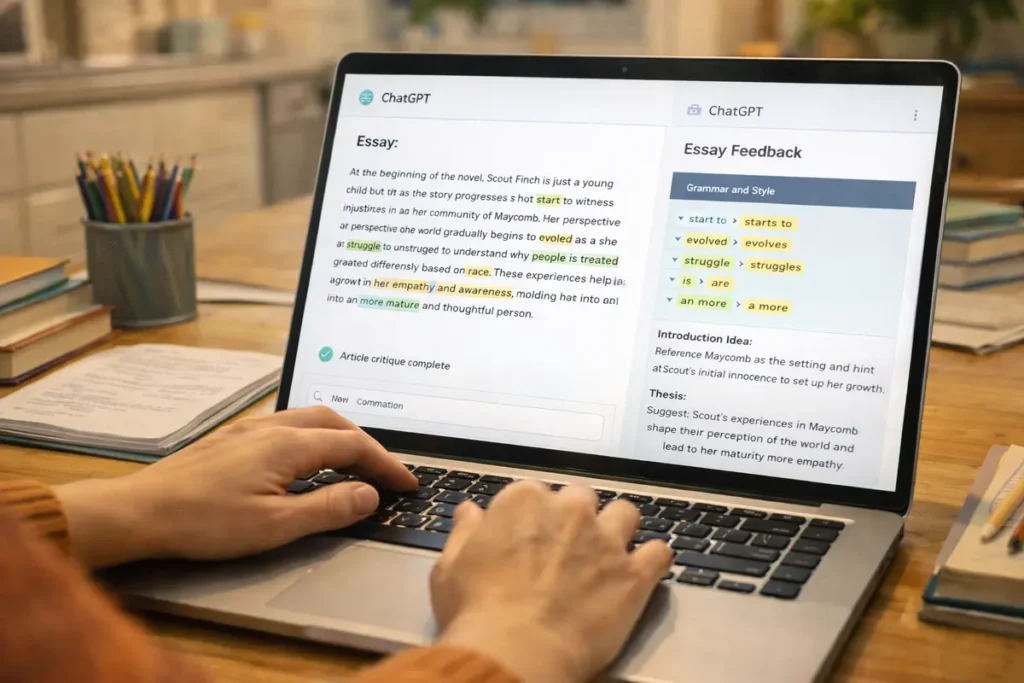
Step 1: Copy the essay text
Paste your child’s essay directly into ChatGPT.
If the essay is long, break it into sections:
- Introduction
- Body paragraphs
- Conclusion
This actually improves feedback quality.
Parent tip: Remove your child’s name to keep feedback neutral.
Step 2: Clearly state the grade level
This step is critical—and often skipped.
Always tell ChatGPT:
- Grade level
- Essay type (narrative, persuasive, expository, etc.)
Example:
“This is a 5th-grade persuasive essay written by a homeschooling student.”
Without this, feedback may be too advanced or too basic.
Step 3: Use a strong grading prompt
The quality of results depends on your prompt.
Below are copy-paste prompts you can use immediately.
Copy-paste ChatGPT prompts for essay grading.
Prompt 1: General essay grading (most parents start here)
You are an experienced English teacher.
Please review and grade the following essay written by a [GRADE LEVEL] student.
Evaluate:
- Grammar and spelling
- Organization and structure
- Clarity of ideas
- Overall strengths and areas for improvement
Provide kind, constructive, age-appropriate feedback.
Prompt 2: Rubric-style grading (great for older kids)
Grade this essay using the following rubric:
Content and ideas (10 points)
Organization and flow (10 points)
Grammar and mechanics (10 points)
Give a score for each category and explain your reasoning in simple language.
Prompt 3: Gentle feedback for younger children
This essay was written by a young child.
Please give encouraging feedback.
Start with what the child did well.
Then suggest only 2 or 3 simple improvements.
Avoid harsh or discouraging language.
Prompt 4: Revision help (without rewriting the essay)
Suggest ways the student can improve clarity and sentence structure
without rewriting the essay or giving exact sentences.
Explain suggestions in a child-friendly way.
How fast is “seconds,” really?
Most essay feedback appears in 10–20 seconds.
Compare that to:
- 20–40 minutes of manual grading
- Mental fatigue
- Second-guessing yourself
Even if you spend 5 minutes reviewing and adjusting the feedback, you’re still saving massive time.
How this improves learning (not just saves time)

Fast feedback matters.
When children get feedback:
- Immediately
- Clearly
- Without emotional tension
They’re more likely to:
- Revise their work
- Try again
- Enjoy writing
Instead of vague comments like:
“Needs improvement.”
You can say:
“Your main idea is clear. Adding one example in the second paragraph would make it stronger.”
That kind of feedback builds confidence, not fear.
Common mistakes parents make (and how to avoid them)
Mistake 1: Trusting AI blindly
Always read the feedback first.
Sometimes suggestions may:
- Be too advanced
- Miss curriculum expectations
- Sounds unnatural for your child
You are still the final filter.
Mistake 2: Overcorrecting everything
ChatGPT might highlight many issues.
Don’t fix them all at once.
Choose:
- 1–2 grammar points
- 1 writing improvement
Too much feedback can overwhelm kids.
Mistake 3: Removing encouragement
AI feedback is neutral by nature.
Always add:
- “I’m proud of your effort.”
- “This idea was really strong.”
That emotional connection matters more than perfect grammar.
Is this cheating? A question many parents ask
Short answer: No—if used correctly.
Cheating is when:
- The child doesn’t do the work
- The AI writes the essay
- The child copies feedback blindly
Learning happens when:
- The child writes independently
- AI gives feedback
- The child revises and reflects
Used this way, ChatGPT becomes a learning coach, not a shortcut.
Best ages and grades for AI-assisted grading
ChatGPT works best for:
- Grades 3–12
- Homeschool writing programs
- Essay-heavy subjects (English, history, social studies)
For very young children (K–2):
- Use it sparingly
- Focus more on verbal feedback and encouragement
Conclusion: Smarter grading, calmer homeschooling
Grading essays doesn’t have to steal your evenings—or your confidence.
When used thoughtfully, ChatGPT:
- Saves time
- Improves feedback quality
- Reduces parent burnout
- Helps children grow as writers
You’re not outsourcing your role.
You’re strengthening it.
Once you experience how fast, fair, and helpful AI-assisted grading can be, it’s hard to go back to red pens and late nights.
How to Grade Essays With ChatGPT: Step-by-Step
Essay grading is one of the most time-consuming parts of homeschooling, and one of the tasks AI handles best. Here is the exact process for using ChatGPT to grade your child’s essays quickly and accurately.
Step 1: Set the Grading Criteria First
Before pasting your child’s essay, tell ChatGPT exactly what to look for. A clear grading prompt produces far better feedback than a vague one. Try this: “You are grading a 7th grade persuasive essay. Evaluate it on: (1) a clear thesis statement, (2) three supporting arguments with evidence, (3) a counterargument addressed, (4) grammar and sentence variety, (5) a strong conclusion. Give a score out of 20 and specific feedback on each criterion.”
Step 2: Paste the Essay
After your grading prompt, type: “Here is the essay:” and paste the full text. ChatGPT will apply your criteria to the specific content your child wrote, not to a generic essay template.
Step 3: Ask for Student-Facing Feedback
After receiving the grading breakdown, follow up with: “Now rewrite your feedback as if you are speaking directly to the student. Use encouraging language. Point out what they did well before explaining what to improve.” This gives you feedback that is ready to share with your child without additional editing.
The Best Prompts for Common Essay Types
Persuasive Essay Grading Prompt
“Grade this [grade level] persuasive essay. Check for: clear position statement, minimum three supporting reasons with evidence, acknowledgment of opposing view, transitions between paragraphs, and a call-to-action conclusion. Score out of 25 with specific comments on each element.”
Narrative Essay Grading Prompt
“Grade this [grade level] narrative essay. Evaluate: engaging opening, clear sequence of events, descriptive language and sensory details, character or setting development, and satisfying ending. Score out of 20 with feedback on what worked and what to improve.”
Research Report Grading Prompt
“Grade this [grade level] research report. Check for: clear introduction with thesis, organized body paragraphs each covering one main point, evidence cited accurately, own words used throughout (not copied), and a conclusion that synthesizes the research. Score out of 30 with specific feedback per section.”
Supplementing ChatGPT Grading With Grammarly
ChatGPT handles content, argument quality, and structure well. For detailed grammar and spelling feedback, combine it with Grammarly. Run the essay through Grammarly first to catch mechanical errors, then submit to ChatGPT for content and argument evaluation. This two-tool approach gives your child both the mechanical polish and the substantive writing feedback that produces real improvement over time.
For math grading and adaptive practice, StarSpark AI handles the equivalent role — providing immediate, step-by-step feedback on math work that would otherwise require significant parent time to assess.
Try StarSpark AI — Instant Math Feedback for Home Learners
Related: 7 clever ways to use ChatGPT for homeschooling and our guide to the best AI tools for homeschool parents.
Views: 0