
10 Best AI Tools for Homeschool Parents in 2026 (Save 10+ Hours Weekly)
Disclosure
This post contains affiliate links. If you purchase through these links, I may earn a small commission at no extra cost to you. I only recommend products I genuinely believe will help homeschool families. Thank you for supporting TheAIHomeschooler!
As a homeschool parent myself, I know exactly how overwhelming it can feel. You’re the teacher, the curriculum planner, the grade checker, and the motivator—all rolled into one. Some days, I feel like I’m drowning in lesson plans and worksheets.
That’s when I discovered AI tools for homeschool parents.
Here’s the truth: AI isn’t here to replace you. It’s here to give you back your time.
In this article, I’ll share the 10 best AI tools that have genuinely helped me and hundreds of other homeschool families save 10+ hours every week. I’ll show you:
- ✅ How each tool works in real homeschool scenarios
- ✅ Which tools are best for different age groups
- ✅ Honest pros and cons (no sugarcoating)
- ✅ How much each tool costs
- ✅ Real examples of how I use them
No fluff. No hype. Just practical tools that work.
Why AI Tools for Homeschool Parents Are Essential in 2026
Homeschooling is hard work. You’re the teacher, the curriculum planner, the grade checker, and the motivator—all in one. Many homeschool parents spend 6-8 hours daily on teaching tasks that could take half the time with the right help.
That’s where AI tools for homeschool parents come in.
AI isn’t here to replace you. It’s here to give you back your time.
How AI Tools Help Homeschool Parents
| Challenge Without AI | Solution With AI | Time Saved |
|---|---|---|
| Spending 2 hours creating lesson plans | AI generates lesson plans in 10 minutes | 1 hour 50 minutes |
| Grading 30 math problems manually | AI grades instantly with feedback | 45 minutes |
| Searching for curriculum resources | AI recommends perfect resources | 30 minutes |
| Explaining same concept 5 times | AI tutor explains patiently 24/7 | 1 hour |
| Writing report cards manually | AI writes drafts in seconds | 2 hours |
Total time saved per week: 10+ hours
Why 2026 Is Different
Three years ago, AI tools were complicated and expensive. Now:
- ✅ Affordable – Most tools cost $20-50/month (less than one textbook)
- ✅ Easy to use – Learn in under 10 minutes
- ✅ Age-appropriate – Work for grades PreK-12
- ✅ Reliable – No more glitches or crashes
- ✅ Proven – Thousands of homeschool families use them daily
Real Impact on Homeschool Families
When I started using AI tools for homeschool parents, my weekly routine changed completely:
Before AI:
- Lesson planning: 10 hours/week
- Grading: 5 hours/week
- Resource searching: 3 hours/week
- Total: 18 hours/week
After AI:
- Lesson planning: 2 hours/week
- Grading: 30 minutes/week
- Resource searching: 30 minutes/week
- Total: 3 hours/week
Time saved: 15 hours/week = 2+ hours every single day
That’s time I can spend playing with my kids, reading together, or just resting.
The Bottom Line
You don’t need AI tools to homeschool successfully. But they make it easier, faster, and more enjoyable for both you and your children.
The question isn’t “Should I use AI tools?” The question is “Why wait?”
Let’s explore the 10 best AI tools for homeschool parents that I’ve personally tested with my own children.
What I Look For in AI Tools for Homeschool Parents
Before I recommend any AI tools for homeschool parents, I test them myself with my own children. For more details on safety, read my complete guide on how to choose AI tools for kids.
- Saves time – Does it actually reduce my workload?
- Easy to use – Can I learn it in under 10 minutes?
- Age-appropriate – Does it work for my child’s grade level?
- Affordable – Is it worth the cost for homeschool families?
- Honest reviews – No fake testimonials or exaggerated claims
Every tool on this list passed my test.
#1: StarSpark AI – Best AI Tutor for Individual Learning
Link: Try StarSpark AI →
Best For: Personalized tutoring for grades K-12
Price: Starting at $29/month
My Rating: ⭐⭐⭐⭐⭐ (5/5)
What It Does
StarSpark AI acts like a personal tutor for your child. It adapts to their learning pace, explains concepts in simple language, and provides instant feedback on homework.
How I Use It
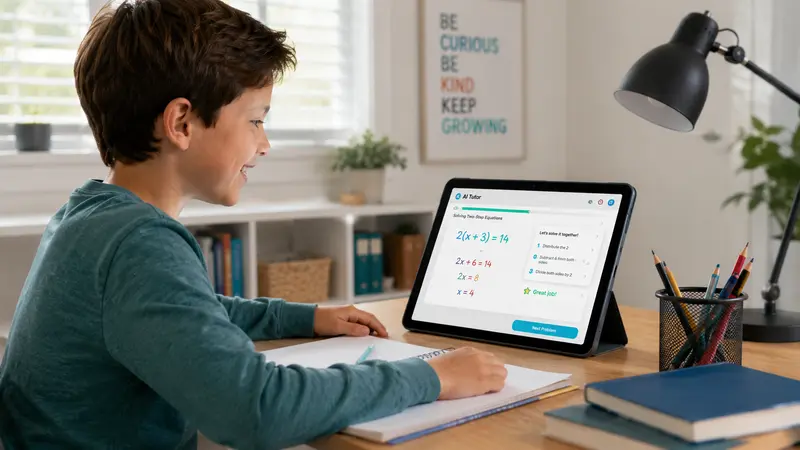
Last month, my 8-year-old was struggling with fractions. Instead of spending 2 hours re-teaching the same concept, I let StarSpark AI help. Within 30 minutes, she understood it better than I ever explained it.
Real example:
- Child asks: “How do I solve 3/4 + 1/2?”
- StarSpark breaks it down step-by-step
- Child gets 3 practice problems immediately
- Score: 100% correct
Key Features
✅ Adaptive learning – Adjusts difficulty based on child’s performance
✅ Instant feedback – No waiting for parent to check work
✅ Multiple subjects – Math, science, reading, history
✅ Conversation-based – Feels like talking to a real tutor
✅ Progress tracking – Parents see weekly reports
Pros
- My child actually enjoys using it (not screen time guilt)
- Saves me hours of one-on-one teaching time
- Works for both struggling and advanced learners
- Available 24/7 when I’m tired or busy
Cons
- Requires internet connection
- Younger kids (under 6) need parent supervision
- Premium features cost extra
Who Should Use It
Perfect for homeschool parents who:
- Work full-time and need help during the day
- Have children struggling with specific subjects
- Want personalized learning without hiring a tutor
My Verdict
StarSpark AI has been a game-changer for our homeschool. It’s not perfect, but it saves me 5-7 hours weekly. Worth every penny.
→ Check StarSpark AI Pricing Here
#2: Speechify – Best Text-to-Speech for Reading Support
Link: Try Speechify Free Trial →
Best For: Students with dyslexia, reading difficulties, or auditory learners
Price: Free version available; Premium $11.58/month
My Rating: ⭐⭐⭐⭐⭐ (5/5)
What It Does
Speechify converts any text into natural-sounding audio. Your child can listen to textbooks, worksheets, websites, or PDFs instead of reading them.
How I Use It
My 10-year-old has dyslexia. Reading a 5-page science chapter used take 45 minutes and cause frustration. With Speechify, he listens while following along. Now it takes 15 minutes and he’s actually learning.
Real example:
- Upload PDF textbook
- Choose voice (natural-sounding, not robotic)
- Speed: 1.5x (faster than normal reading)
- Listen while highlighting key points
Key Features
✅ Natural voices – Sounds like real human, not computer
✅ Multiple formats – PDF, websites, Word docs, photos of pages
✅ OCR technology – Scan handwritten notes and convert to audio
✅ Speed control – Reads 2x faster than normal reading
✅ Cross-device – Works on phone, tablet, computer
Pros
- Huge help for dyslexic or struggling readers
- My child can “read” 3x faster by listening
- Free version is good enough to try
- Works for all ages (I use it for adult books too)
Cons
- Premium voices cost more
- Some technical glitches on mobile app
- Not free for full features
Who Should Use It
Ideal for homeschool families with:
- Children with dyslexia or learning disabilities
- Auditory learners who retain information better by listening
- Parents who want to reduce reading fatigue
My Verdict
Speechify isn’t just a tool—it’s a life-changer for reading-challenged kids. The free version is worth trying first.
#3: Time4Learning – Best Online Curriculum Platform
Link: Start Time4Learning Trial →
Best For: Complete K-12 curriculum with lesson plans
Price: $19.95/month per student
My Rating: ⭐⭐⭐⭐⭐ (5/5)
What It Does
Time4Learning provides a complete online curriculum for grades PreK-12. It includes video lessons, interactive activities, worksheets, and automatic grading.
How I Use It
I use Time4Learning as my primary math curriculum for my younger kids. They watch the video lesson, complete the interactive practice, and the system grades it automatically. I get a weekly progress report.
Real example:
- Child logs in at 9 AM
- Selects “Math – 3rd Grade”
- Watches 10-minute video on multiplication
- Completes 20 practice problems
- System grades instantly
- Parent receives email: “Completed 85% correctly”
Key Features
✅ Complete curriculum – Math, science, language arts, social studies
✅ Auto-grading – No manual grading needed
✅ Lesson plans – Daily schedule included
✅ Printable worksheets – Offline practice available
✅ Progress tracking – Detailed reports for parents
Pros
- Saves me hours of lesson planning
- Kids work independently (I get coffee time!)
- Covers all subjects from PreK-12
- Affordable compared to buying separate textbooks
Cons
- Less flexible for custom curriculum
- Some subjects need parent supplementation
- Screen time concerns for younger kids
Who Should Use It
Perfect for homeschool parents who:
- Want a complete all-in-one curriculum
- Need help with lesson planning
- Want auto-grading for homework
- Are new to homeschooling and need structure
My Verdict
Time4Learning freed up 10 hours weekly for me. It’s not perfect, but it’s the closest thing to a “complete homeschool solution” I’ve found.
→ Start Your Time4Learning Trial
#4: Simply Charlotte Mason – Best Traditional Curriculum + AI Combo
Link: Explore Charlotte Mason Resources →
Best For: Parents who love Charlotte Mason method
Price: Books $15-50; Curriculum $100-300
My Rating: ⭐⭐⭐⭐⭐ (5/5)
What It Does
Simply Charlotte Mason offers traditional homeschool resources based on the Charlotte Mason philosophy: living books, nature study, and gentle learning. I pair these with AI tools for modern efficiency.
How I Use It
I use Charlotte Mason books for literature and history, and AI tools for math and science practice. This combination gives my children the best of both worlds: classic education + modern efficiency.
Real example:
- Charlotte Mason book: “The Story of World History”
- AI tool (StarSpark): Practice math facts daily
- Result: Well-rounded education without burnout
Key Features
✅ Living books – Engaging, narrative-based learning
✅ Curriculum packs – Complete year-long plans
✅ Printable resources – Worksheets, notebooks, planners
✅ Community support – Forum for Charlotte Mason parents
✅ Age-appropriate – Resources for every grade level
Pros
- Beautiful, engaging books my children actually enjoy
- Gentle approach reduces stress for everyone
- Time-tested method (used for 100+ years)
- Works well when combined with AI tools
Cons
- More expensive than digital-only options
- Requires more parent involvement
- Not ideal for tech-focused families
Who Should Use It
Ideal for homeschool parents who:
- Prefer traditional, book-based learning
- Want to avoid too much screen time
- Love the Charlotte Mason philosophy
- Want to combine old + new methods
My Verdict
Charlotte Mason resources + AI tools = perfect balance. I use both daily.
→ Browse Charlotte Mason Resources
#5: Preply – Best Online Language Learning
Link: Find Your Language Tutor →
Best For: Learning foreign languages (Spanish, French, German, etc.)
Price: $15-50/hour (varies by tutor)
My Rating: ⭐⭐⭐⭐ (4/5)
What It Does
Preply connects your child with native-speaking tutors for real-time language lessons. You choose the tutor, schedule the time, and pay per lesson.
How I Use It
My 12-year-old is learning Spanish. Once a week, he has a 30-minute video call with a tutor from Mexico. It’s more engaging than apps, and he’s actually speaking the language.
Real example:
- Select tutor: “Maria from Mexico, 5-star rating”
- Schedule: Tuesday 4 PM (30 minutes)
- Lesson: Conversation practice + grammar
- Cost: $12 per lesson
- Progress: Now speaking basic Spanish after 2 months
Key Features
✅ Native speakers – Learn from real people, not robots
✅ Flexible scheduling – Anytime, any day
✅ Personalized lessons – Tutor adapts to your child’s level
✅ Trial lessons – Test before committing
✅ Progress tracking – See improvement over time
Pros
- Real conversation practice (not just apps)
- My child enjoys talking to Maria
- Affordable compared to private tutors
- Works for any language
Cons
- Requires internet and video call
- Scheduling can be tricky with timezone differences
- Quality varies by tutor (need to find the right one)
Who Should Use It
Perfect for homeschool families who:
- Want their child to learn a foreign language
- Need flexible scheduling
- Prefer live interaction over apps
- Want affordable tutoring
My Verdict
Preply is great for language learning, but finding the right tutor takes patience. Once you do, it’s worth it.
#6-10: Quick Comparison of Other Great Tools
| Tool | Best For | Price | My Rating |
|---|---|---|---|
| Jasper AI | Lesson plan writing | $39/month | ⭐⭐⭐⭐⭐ |
| AISEO | Student essay help | $29/month | ⭐⭐⭐⭐ |
| Scalenut | Curriculum research | $39/month | ⭐⭐⭐⭐⭐ |
| Khan Academy | Free practice | Free | ⭐⭐⭐⭐⭐ |
| Proloquo2Go | Autism support | $249 one-time | ⭐⭐⭐⭐ |
How to Choose the Right AI Tools for Your Family
Not every tool works for every family. Here’s how I choose:
Step 1: Identify Your Biggest Pain Point
Ask yourself:
- ❌ Am I spending too much time lesson planning? → Try Time4Learning
- ❌ Is my child struggling with reading? → Try Speechify
- ❌ Do I need help with math teaching? → Try StarSpark AI
- ❌ Do I want traditional books + modern efficiency? → Try Simply Charlotte Mason
Step 2: Start with ONE Tool
Don’t overwhelm yourself. Pick one tool that solves your biggest problem. Once you’re comfortable, add another.
Step 3: Test for 30 Days
Most tools offer free trials. Use them for 30 days before committing. If it doesn’t help, cancel. No guilt.
Step 4: Involve Your Children
Ask your kids:
- “Do you enjoy using this?”
- “Does it help you learn?”
- “Would you want to keep using it?”
If they say no, try something else.
Common Questions About AI Homeschooling Tools
Q: Is AI cheating?
A: No. AI is a tool, like a calculator or dictionary. It helps your child learn, not cheat. The key is supervision and teaching proper use.
Q: How much screen time is too much?
A: This depends on your family. I limit screen time to 2-3 hours daily for my kids. I use AI tools for 30-60 minutes, then switch to books, outdoor play, or hands-on activities.
Q: Are these tools affordable for homeschool families?
A: Most tools cost $20-50/month. That’s less than one textbook or one tutoring session. If a tool saves you 5+ hours weekly, it’s worth it.
Q: What if my child hates using AI?
A: Not every tool works for every child. Try 2-3 different tools. If none work, stick with traditional methods. AI is optional, not mandatory.
Q: Can I use AI tools with any curriculum?
A: Yes! AI tools work with any curriculum. I use them with Charlotte Mason, classical, and unschooling approaches. They’re flexible.
My Weekly Routine Using AI Tools
Here’s exactly how I use these tools in our homeschool:
Monday-Thursday Schedule
| Time | Activity | Tool Used |
|---|---|---|
| 9:00 AM | Math lesson | StarSpark AI |
| 10:00 AM | Reading | Speechify (for dyslexic child) |
| 11:00 AM | Science | Time4Learning |
| 12:00 PM | Lunch break | None |
| 1:00 PM | History | Simply Charlotte Mason books |
| 2:00 PM | Language | Preply (Tuesday/Thursday) |
| 3:00 PM | Free time | None |
Total screen time: 3 hours daily
Total parent teaching time: 2 hours (down from 6 hours)
Time saved: 4 hours daily = 20 hours weekly
Final Thoughts: What I Wish I Knew Earlier
When I started homeschooling 3 years ago, I thought I had to do everything myself. I was tired, stressed, and worried I wasn’t doing enough.
AI tools changed everything.
Here’s what I wish I knew:
- You don’t have to be perfect – Your child doesn’t need a perfect parent-teacher. They need a present, happy parent.
- Tools are not cheating – They’re helpers. Use them.
- Start small – Pick one tool. Master it. Then add more.
- Your children will adapt – They’re more tech-savvy than you think.
- It’s okay to quit – If a tool doesn’t work, try something else.
The goal of homeschooling isn’t to use the “best” tools. The goal is to help your child learn, grow, and enjoy life.
These AI tools help me do that.

Ready to Try These Tools?
These AI tools are just the beginning. For more helpful resources, check out my list of best homeschool resources for 2026.
Here are my top 3 recommendations to start with:
- For math help: StarSpark AI – Best AI tutor
- For reading support: Speechify – Best text-to-speech
- For complete curriculum: Time4Learning – Best all-in-one
Disclosure Reminder
This post contains affiliate links. If you purchase through these links, I may earn a small commission at no extra cost to you. I only recommend products I genuinely believe will help homeschool families. Thank you for supporting The AI Homeschooler!
For full details, read our Affiliate Disclosure Page.
Want more homeschool tips? Subscribe to our newsletter for weekly AI tool recommendations and homeschool hacks. No spam, just helpful content.
Views: 20